THE WINDOWS VIRTUAL TABLETOP FOR YOUR TABLE AND ONLINE PLAYERS.

Your world.
Brought to life.

Show battle maps, reveal hidden rooms, and run encounters from your own computer. Play around a TV table or invite remote players through a browser link.

DungeonRig in action

Animated map by Dynamic Dungeons.

What does DungeonRig do?

DungeonRig is a Windows virtual tabletop (VTT) for tabletop roleplaying games. It helps the game master show maps, track fights, play music, reveal hidden rooms, and present story moments on a TV or to online players.

You still run the story. Players still roll dice. DungeonRig handles the screen, the map, the fog, and the dramatic presentation so the table can stay focused on the adventure.

Game Masters using DungeonRig

Free to play. Yours to keep for $19.99.

DungeonRig is not a subscription and never will be. You can run a full campaign without paying anything. The Founder Edition is for the game masters who want all current and future maps, including exclusive packs, and no encounter limits — and who would rather own their tools than rent them.

Free

$0no account needed

Download and play tonight.

  • Maps, fog and music for local play; verify your email to play online
  • Bring your own library: import as many of your own maps and tokens as you like, forever
  • All current and future DungeonRig tokens
  • Your campaigns stay on your machine, separate from the game installation
  • Limited tokens in play: 2 player characters and 3 monsters per encounter.
  • Limited included maps: starter map pack only.
Download for Windows

Registered

$0verify your email

More maps and online play available.

  • Everything in Free
  • Online play and all current and future non-exclusive maps
  • Exclusive map packs may be purchased separately
  • Limited tokens in play: 2 player characters and 3 monsters per encounter.
Register free
Best value

Founder Edition

$19.99one time, tax included

All tokens and maps, forever.

  • Everything in Registered
  • All current and future tokens and maps forever, including exclusive map packs
  • No encounter limits — run encounters as big as your table wants
  • One licence for up to three computers
  • Perpetual licence. No subscription, no renewal, no login required
Buy Founder Edition

Key delivered by email in seconds. Sold by Red Autumn Software AS.

Why choose Founder?

One payment. Yours to keep.

A perpetual licence with no monthly fees. Your campaigns stay on your computer.

Your map library keeps growing

350 maps and growing. All current and future DungeonRig maps and tokens, including exclusive map packs.

Help shape DungeonRig

Send feedback straight to the developers from inside the app.

Play together. Wherever you are.

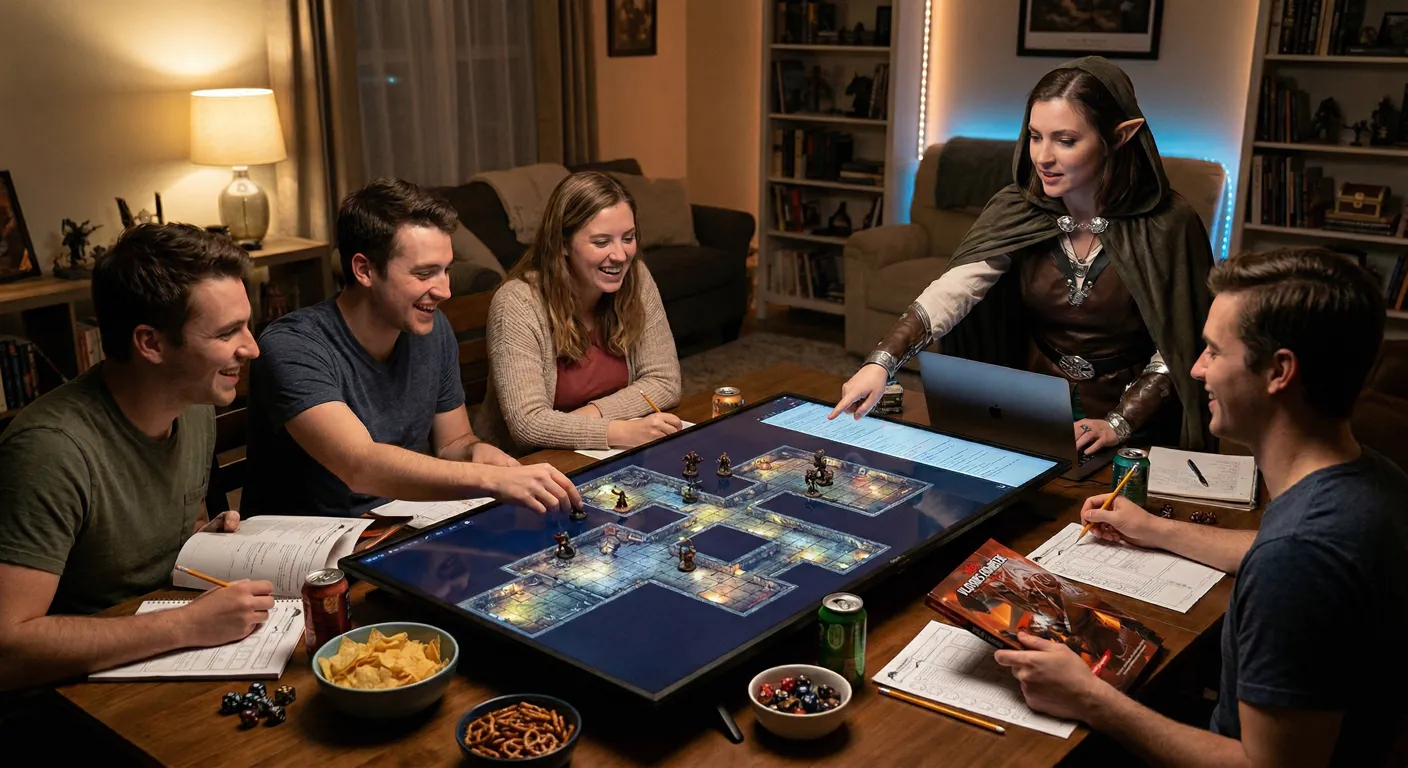
Friends gathered around a battle map on a tabletop screen

Around your table

Show the map on a TV or second screen. Bring your friends, dice and miniatures.

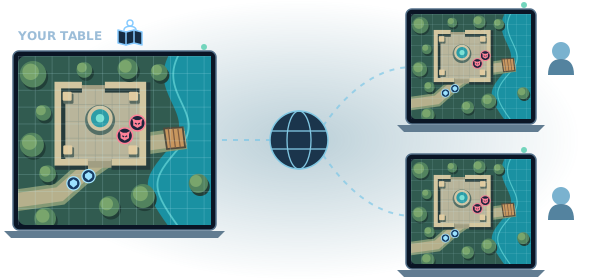
The Dungeon Master's map connected over the internet to friends playing in their browsers

Connect with friends online

Share your lobby link. Friends join in their browser on Windows, Mac, Linux, tablets or phones.*

No player installation. No player account.

* Players need a compatible, up-to-date browser and internet access. The host needs DungeonRig on Windows 10/11, a registered account and internet access.

Plan Adventures Visually

Lay out your campaign as places, scenes, and encounters you can click during play.

Build Worlds As Connected Places

Every great adventure has towns, roads, dungeons, choices, and surprises. DungeonRig lets you lay those pieces out visually, then jump to the right place when the party goes there.

Worlds And Regions

Organize your campaign into big areas, smaller places, and the scenes inside them.

Clickable Places

Each point can be a town, dungeon, encounter, or story scene.

Drag, Drop, Connect

Drag places around, connect them, and attach maps, notes, music, or scenes.

Quick Session Jumping

During play, click the next place and bring up the map, notes, or scene you need.

Adventure Node Map

What You Can Do

A plain tour of the tools you use before and during a session.

Battle Maps

Show beautiful maps, reveal rooms, and keep combat easy to follow.

Still And Moving Maps

Use image maps, animated map videos, or YouTube map backgrounds at the table.

Your battle map feels alive without extra setup.

Import Prepared Maps

Bring in maps from tools like Dungeondraft or Dungeon Alchemist, including walls and light where available.

Use the prep work you already did.

Easy Grid Alignment

Move, resize, color, and fade the grid until it fits the map.

No more fighting a map that is slightly off.

Fog Of War

Hide rooms until players reach them. Reveal areas by hand or let character vision do the work.

Exploration feels natural at the table.

Spell And Area Markers

Draw cones, circles, lines, cubes, and quick notes on top of the map.

Show the fireball before anyone argues about it.

Mood Controls

Change brightness, color, and atmosphere while you play.

Turn a sunny road into a night ambush in seconds.

Keep The Table Feeling Like A Table.

Use books, notes, dice, and miniatures if you like. DungeonRig adds maps, music, hidden rooms, and character tracking without replacing the heart of the game.

Character & Party Management
Built for actual play

Your dice on the table. Your story in motion.

DungeonRig is built around how tabletop RPGs actually feel: players ask questions, roll dice, search books, and make messy choices. The app supports that with clear sheets, visible status, and a party overview for the GM.

Character Sheets

Stats, abilities, spells, and notes in one place.

Party Overview

See hit points, armor class, conditions, and turn order at a glance.

Status Effects

Mark poison, stun, concentration, or custom conditions during play.

Turn Order

Roll initiative in the app or enter results from real dice.

Monsters and NPCs

Keep creature details ready for fights and roleplay scenes.

Portraits and Tokens

Use artwork for characters, monsters, scenes, and the battle map.

Can My PC Run It?

DungeonRig runs on Windows 10 or 11, 64-bit. Performance depends on your maps and media — try your intended setup before a session. Only the game master needs the app; players join through a compatible browser.

Operating System

Windows 10 or 11, 64-bit

Memory

Memory needs depend on your maps and media. Try your intended setup before a session.

Disk Space

The launcher downloads the game separately. Keep extra space for updates, backups and your media.

Graphics

Performance depends on your device and map complexity; a tested hardware baseline is still being established.

Table Play (Optional)

A TV or second monitor over HDMI or DisplayPort for the player view

Your Players

Join in a modern web browser without the desktop app. Test your intended browser and device before a session.

Ready to try it? Head to the download page — it has the step-by-step install guide and explains the Windows notice some people see.

Frequently Asked

Before your first session.